
Post #15: Calling All Spreadsheet Wizards
A fun spreadsheet story for you today. Impossible, I hear you say.
Back when I was earning my Digital Bookkeeper Association Certification, calculating product cost allocation got repetitive. Same formula over and over again.
Then I had the brilliant idea to automate it (shocking, I know). But seriously, wouldn’t it be sweet to simply punch the numbers into a calculator somewhere and have it run the numbers for you?!
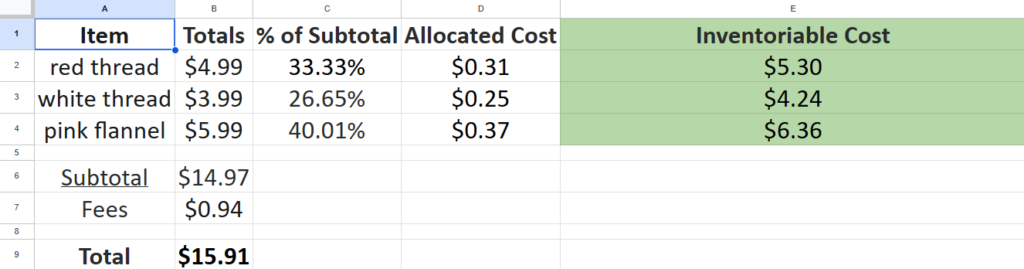
– Find the percentage of the subtotal that each item was purchased for.
– Do the same for any fees or tax.
– Combine the allocated subtotal and the allocated cost and VOILA! The inventoriable cost.
So I spent an afternoon in Google Sheets laying out all the data in a manner that made sense to me, and then linking the appropriate cells with different commands and such. And it worked! So thanks Product Cost Allocator Calculator 5000, I owe you one.
Looking back on this, a calculator for this probably already existed somewhere online. But I didn’t even consider that at the time. I had an idea and I made it a reality. No second guessing.
Any other self-proclaimed spreadsheet scientists out there? I’m curious to see all the different kind of tools and calculators people have made in Excel. Let me know in the comments below.
(I also made an amortization schedule calculator, but that was too easy and much too boring.)